

Hello! ☕
Imagine you're organizing your room: you need labeled boxes to store things like your name tag, your age number, or whether you're a student (yes/no). In JavaScript, variables are exactly those labeled boxes — they store data so you can use it later.
Without variables, your code would be messy and repetitive. Variables make your programs reusable, readable, and powerful.
Today we'll cover the absolute basics:
What variables are and why we need them
Declaring with var, let, and const
Primitive data types
Key differences between var, let, const
Simple explanation of scope
All examples are short and practical — perfect for beginners!
What Are Variables and Why Do We Need Them?
A variable is a named storage for data.
Think of it as a box with a label:
Label = variable name
Inside = the value (data)
Real-life example:
let name = "Priya";      // box labeled "name" holds string "Priya"
let age = 22;            // box labeled "age" holds number 22
let isStudent = true;    // box labeled "isStudent" holds true/false
We need variables to:
Remember values (name, score, etc.)
Reuse them (calculate, display, etc.)
Make code clean and changeable
How to Declare Variables: var, let, const
Three ways to create variables (keywords):
var → old way (pre-2015), avoid in modern code
let → modern, changeable value
const → modern, constant value (can't reassign)
Examples:
var score = 85;          // old style
let temperature = 28.5;  // changeable
const pi = 3.14;         // fixed value
Modern rule: Use const by default. Use let only when you need to change the value later. Avoid var.
Primitive Data Types
JavaScript has 5 main primitive types (basic building blocks):
String → text, in quotes
let city = "Ahmedabad";
let greeting = 'Hello cohort!';
Number → integers or decimals (no quotes)
let age = 25;
let price = 99.99;
Boolean → true or false (no quotes)
let isLoggedIn = true;
let hasCoffee = false;
null → intentionally empty (no value)
let phone = null; // "I have no phone number yet"undefined → variable declared but no value assigned
let favoriteColor;   // automatically undefined
console.log(favoriteColor); // undefined
Primitives are simple, single values. (Later we'll see objects/arrays are composite.)
Basic Differences Between var, let, and const
Here's a clear comparison (modern best practices):


Key points:
var: Function/global scope, can redeclare, can reassign
let: Block scope, cannot redeclare in same scope, can reassign
const: Block scope, cannot redeclare, cannot reassign (but object/array contents can change)
Reassign examples:
let count = 10;
count = 15;      // OK

const maxUsers = 100;
maxUsers = 200;  // Error! Cannot reassign const
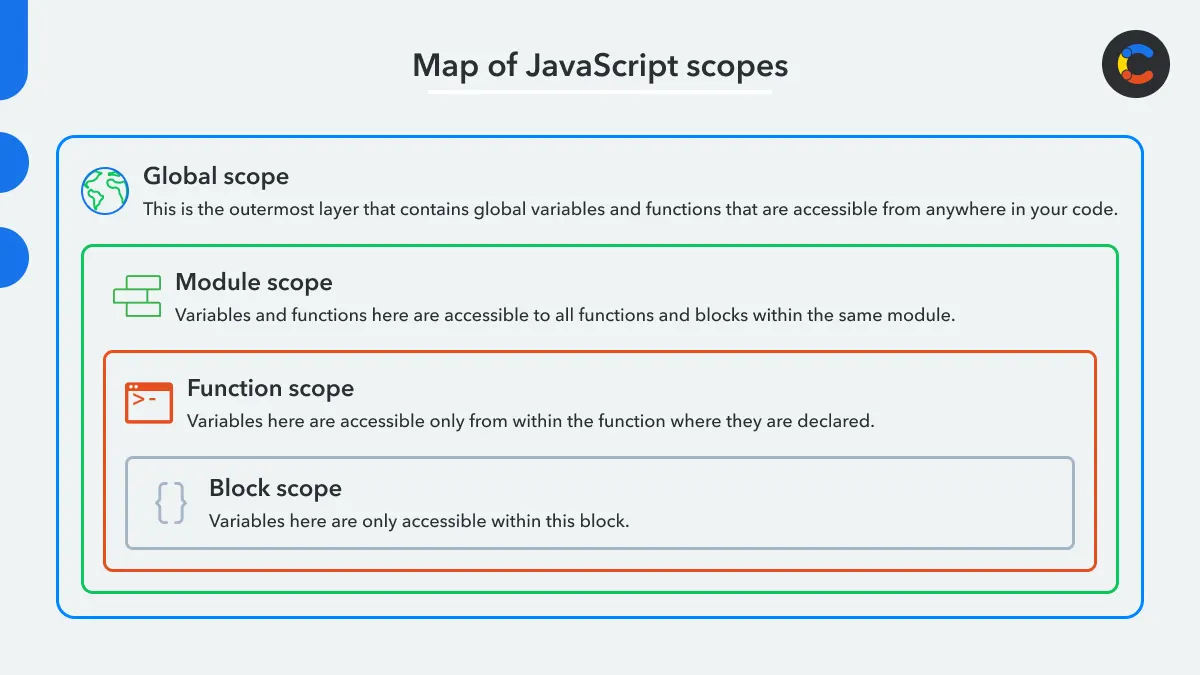
What is Scope? (Beginner-Friendly)
Scope = where a variable is visible/accessible.
Think of it as rooms in a house:
Global scope → outside everything (visible everywhere, but avoid too many globals)
Function scope → inside a function (visible only there)
Block scope → inside { } like if/for blocks (only let and const respect this)
Simple example:
let globalName = "Cohort";          // global

function sayHello() {
  let message = "Hi!";              // function scope
  console.log(globalName);          // works (accesses global)
  console.log(message);             // works
}

sayHello();

console.log(globalName);            // works
console.log(message);               // Error! message not accessible outside function
Block example:
if (true) {
  let blockVar = "I'm hidden";
  console.log(blockVar);            // works
}

console.log(blockVar);              // Error! blockVar not accessible outside { }
var ignores block scope (old behavior):
if (true) {
  var oldVar = "I'm leaking";
}
console.log(oldVar);                // works (var leaks out)
Mini Assignment – Practice in Console!
Declare variables for:
name (string) → your name
age (number) → your age
isStudent (boolean) → true/false
let name = "Your Name";
let age = 20;
let isStudent = true;
Print them:
console.log(name, age, isStudent);Try changing values:
Change age with let → should work
Try changing a const variable → observe the error
Share your code and what happened (especially the error) in the cohort group!
Diagram Ideas (Visual Summary)
var vs let vs const comparison table — use one of the images above (clear tables with scope, reassign, redeclare)
Simple scope visualization — nested boxes showing global → function → block access

Variables + data types are the foundation of JavaScript. Master them now and everything else (functions, objects, loops) becomes easier!
Happy coding, cohort! 🚀
Which data type surprised you the most? Drop a comment! 😄
About the author
- Hi, I’m DEVeloper passionate about building software that helps businesses grow, optimize their operations, and increase profitability. I focus on creating practical solutions that solve real-world problems and deliver measurable results.
Comments
Join the discussionNo comments yet. Be the first to comment.


