
JavaScript Arrays 101: The Basics Every Beginner Needs

Hello! ☕
Think about your daily to-do list, your favorite songs playlist, or your exam marks — these are all ordered collections of items. In JavaScript, arrays are exactly that: an ordered list of values stored together under one name.
Arrays make it easy to group related data, access items by position, and loop through them — super common in web dev for lists of products, users, images, etc.
In this beginner post, we'll cover only the fundamentals (no map, filter, etc. yet):
What arrays are and why we need them
Creating arrays
Accessing elements by index
Updating elements
The length property
Basic looping
Let's start with a relatable example!
1. What Arrays Are and Why We Need Them
An array is a single variable that holds multiple values in order.
Without arrays (painful way):
let fruit1 = "apple";
let fruit2 = "banana";
let fruit3 = "mango";
let fruit4 = "orange";

// How to print all? Write 4 console.log lines...
With arrays (clean & scalable):
let fruits = ["apple", "banana", "mango", "orange"];
Why arrays?
Store lists of similar items (names, numbers, objects later)
Easy to add/remove/access by position
Perfect for loops (process every item automatically)
Used everywhere: shopping cart items, API response lists, gallery photos
2. How to Create an Array
Two main ways:
- Array literal (recommended – short & readable):
let marks = [85, 92, 78, 95];
let tasks = ["Learn JS", "Code assignment", "Review notes"];
let mixed = [42, "hello", true, null]; // arrays can hold any type
- Using constructor (less common):
let empty = new Array();
let numbers = new Array(1, 2, 3);
Use literal [] syntax — it's cleaner!
Empty array:
let shoppingCart = [];
3. Accessing Elements Using Index
Arrays are zero-indexed — first item is at index 0, second at 1, etc.
let fruits = ["apple", "banana", "mango", "orange"];

console.log(fruits[0]);  // apple     ← first item
console.log(fruits[1]);  // banana
console.log(fruits[2]);  // mango
console.log(fruits[3]);  // orange

console.log(fruits[fruits.length - 1]); // orange  ← last item (dynamic)

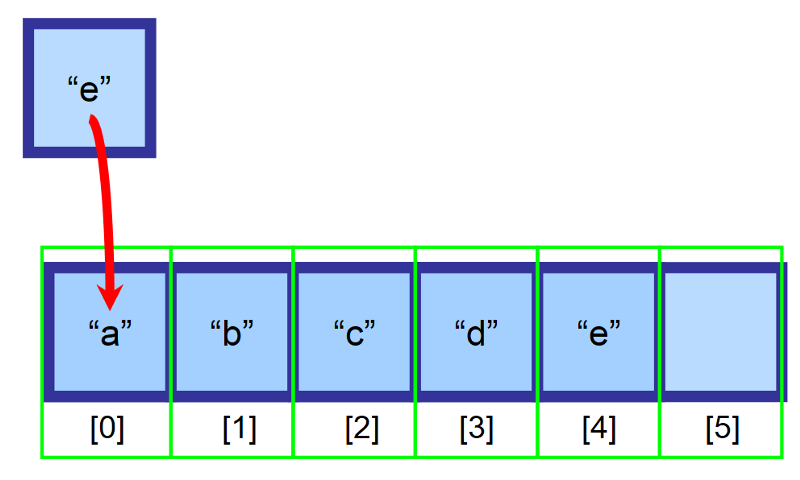
(These visuals show how index 0 points to the first element — notice indexing starts at 0!)
If you access a non-existent index → undefined
console.log(fruits[10]); // undefined
4. Updating Elements
Just assign a new value using the index:
let fruits = ["apple", "banana", "mango", "orange"];

fruits[1] = "kiwi";      // change banana to kiwi

console.log(fruits);     // ["apple", "kiwi", "mango", "orange"]
Arrays are mutable — you can change elements anytime.
5. Array length Property
array.length gives the number of elements (always one more than the highest index).
let fruits = ["apple", "banana", "mango", "orange"];
console.log(fruits.length); // 4

fruits[4] = "grapes";       // add at next position
console.log(fruits.length); // 5 now

console.log(fruits[fruits.length - 1]); // last element: "grapes"
Handy for loops and checking if array is empty:
if (fruits.length === 0) {
  console.log("No fruits yet!");
}
6. Basic Looping Over Arrays
Two simple ways for beginners:
- for loop (classic & clear):
let fruits = ["apple", "banana", "mango", "orange"];

for (let i = 0; i < fruits.length; i++) {
  console.log(`Fruit \({i + 1}: \){fruits[i]}`);
}
// Output:
// Fruit 1: apple
// Fruit 2: banana
// Fruit 3: mango
// Fruit 4: orange
- for...of loop (modern, only values):
for (let fruit of fruits) {
  console.log(fruit);
}
// apple
// banana
// mango
// orange
Use for when you need the index; use for...of when you just need values.
Mini Assignment – Practice in Console!
Create an array of your 5 favorite movies:
let movies = ["Inception", "Interstellar", "The Matrix", "Dune", "Avengers"];Print the first and last element:
console.log("First:", movies[0]);
console.log("Last:", movies[movies.length - 1]);
Change one movie (e.g., update index 2) and print the updated array.
Loop through the array and print every movie with its position:
for (let i = 0; i < movies.length; i++) {
  console.log(`\({i + 1}. \){movies[i]}`);
}
Try it in your browser console and share your array + output in the cohort group!
Arrays are one of the most used data structures in JavaScript. Master creating, accessing, updating, and looping now — next we'll add powerful methods like push, pop, map!
Happy coding, cohort! 🚀
What's in your favorite movies array? Drop it in the comments! 😄


